How to use 'case' statements in Bash scripting
Nested if statements (that is, if statements within if statements) are cool and all, and will usually do the job nicely, but if your list of ifs for all possible outcomes gets bigger and bigger, then the code become unreadable quite quickly... case statements to the rescue!
case is an incredibly useful tool in your scripting arsenal, but so many sysadmins and bash developers don't use it to its full potential. Lets break it down here, and walk through a few of its uses to clear up some confusion,
case EXPRESSION in
    CASE1)
        COMMAND1
        COMMAND2
        ;;
    CASE2)
        COMMAND3
        ;;
    CASE3)
        COMMAND4
        COMMAND5
        COMMAND6
        ;;
    CASE4|CASE5)
        exit
        ;;
    *)
        OTHER COMMANDS HERE
        ;;
esac
What does all that mean?
Lets break it down... (and dont worry if you dont get it at first look, all will become clearer further down)
-
case EXPRESSION incaseis the command we are using ( the one we are learning about right now )EXPRESSIONis the thing we want to test, it could be a string, a number, an input (eg: $1)inis a keyword for the case command to check if EXPRESSION is "in" the below list
-
CASE1)- the first "case" that our expression could be, if
EXPRESSIONmatchesCASE1it will executeCOMMAND1andCOMMAND2below
- the first "case" that our expression could be, if
-
;;this symbol will tellcasethat it has finished executing the correctCOMMANDSfor thisCASEand will now exit thecasestatement altogether. It's a very common mistake to forget to put;;at the end of eachCASEand can case some seriously unwanted code to execute so remember to put it there!
EXPRESSION didn't match CASE1, what now?
well case will continue down the list of cases... so, onto the next CASE!
-
CASE2)- Because no match was made for
CASE1thencasewill not execute any of the commands inside theCASE1block, and will continue down the list toCASE2looking for another match... - If it finds a match in
CASE2then it will executeCOMMAND3inside that block... - if still no match is found,
casewill continue looking further and further down the list until it finds a match
- Because no match was made for
What if it never finds a match?
Great question! thats where this line does its job...
-
*) OTHER COMMANDS HERE ;;- The
*symbol here is considered as a "catch-all", that is to say if noCASEmatched ourEXPRESSIONthen*will catch it, and any commands within the*block will execute. So we know every possible input will be caught somehow.*can be used to catch invalid input and return an error message to the user to wise-up ... (see below)
- The
and ....
esacends thecasestatement, (itscasebackwards, geddit?), again its a common gotcha to forget to end withesacand it will make you crazy trying to figure out whats going wrong, so don't forget it!
Ok, got it.... still completely confused!
No problem my furry little friend.. a picture is worth a 1000 words... so lets look at 3000 words to see some examples of what we learned here...
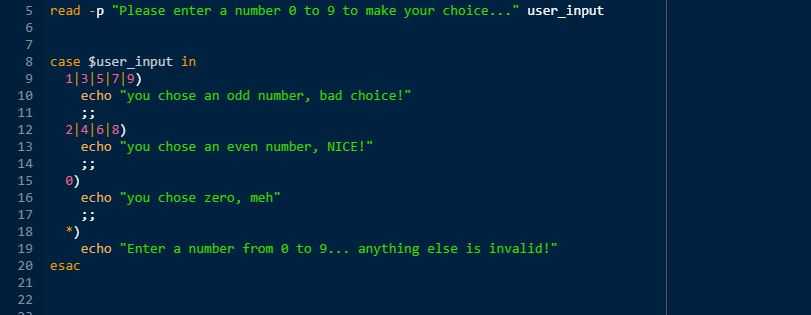
Quick explanation...
- on Line 5, im using the
readcommand (another command for another tutorial TODO(makereadtutorial) to get the user to input a number from 0 to 9, and save that input into a variable called "user_input" - on Line 7 my
casestatement begins, anduser_inputis myEXPRESSIONI am checking the value of. -
if
user_inputis either 1 (this symbol --> | means "or" here) or 3 or 5 or 7 or 9 then execute the code in this block...- echo to the screen our distaste of odd numbers.
- then
;;will exit thecasecommand altogether, no further checks will be made onuser_input
- if no odd number was entered then the first
CASE(odd numbers) will be skipped andcasewill continue down the list... -
The next block is checking if
user_inputis 2 or 4 or 6 or 8. If it is on of these, the code below will execute,- echo to the screen our love of even numbers
;;will exit the case command altogether
- The same logic continues that if
user_inputis 0 (zero) then the code below thatCASEbelow is executed (no strong feelings about zero) - if the user entered the number "38489235" or "10" or "eggs" then it will be caught by
*and the user will be informed they made a mistake with their input and thecasestatement will end, the user could then taken back to the beginning where they again have the option to enter a valid number.
Choices within choices, Options within options....
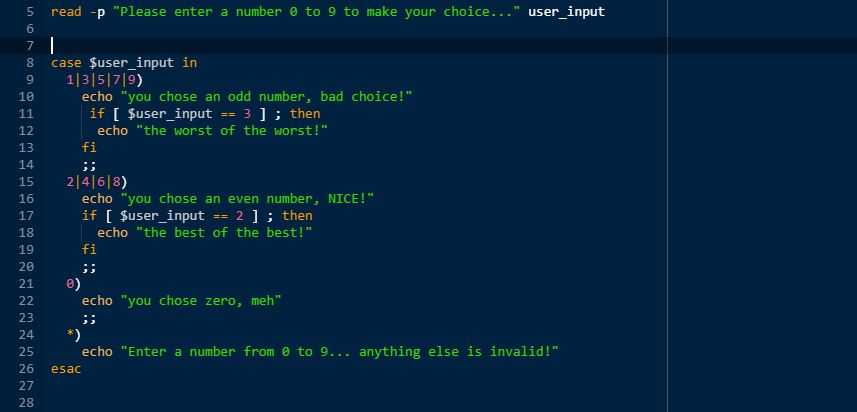
The code here is basically the same as above, just with two minor changes...
we can also embed if statements within case statements, to add more functionality to our checks and outputs...
-
Above we can see if the user enters for
user_inputthe value of "4" then the following code will executeecho "you chose an even number, NICE!"- then there will be a check to see if
user_inputis equal to 2. Obviously 4 is not equal to 2, so this will not be true, and theifstatement ends, as does thecasestatement, and we carry on with our lives...
-
However if the user does enter "2" as
user_inputthen this is the output of our script....

beautiful...
👍 Try to go ahead now and think how you can use
casestatements insidecasestatements, to really fine-tune yourEXPRESSIONmatching
Finally a practical example,
Have a look at this and think how it could help you automate some of your daily work as a sysadmin, all I will explain is that "$1" is a bash standard shortcut for the "first value given after the script name..." so in this example..
my_terminal_prompt:> ./my_awesome_script.sh sean will help you- "my_awesome_script.sh" = "$0" (the actual script)
- "sean" = "$1" (the first parameter)
- "will" = "$2" (the second parameter etc etc)
- "help" = "$3"
- "you" = "$4"
and in this example
systemctl status ntp- status = $1
so, keeping that in mind, have a look below...
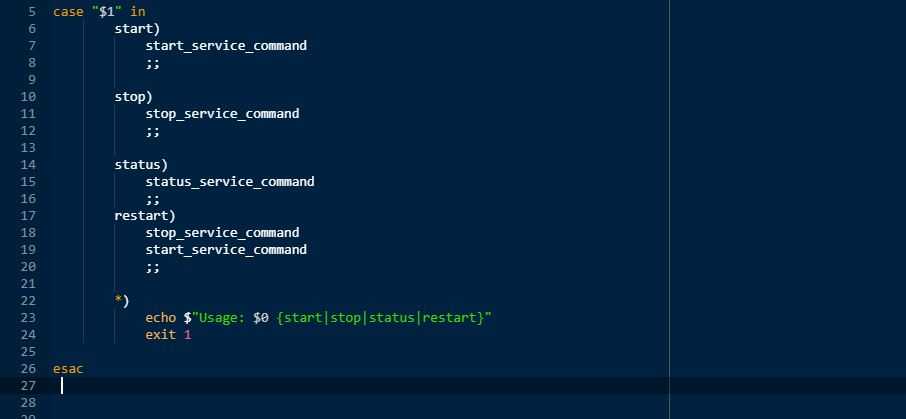
Now go and play my (script) kiddies! Have a great day!
If Sean Helped You today, feel free to share this post or connect with us soon, available via gmail, slack or github. Thanks for reading!